
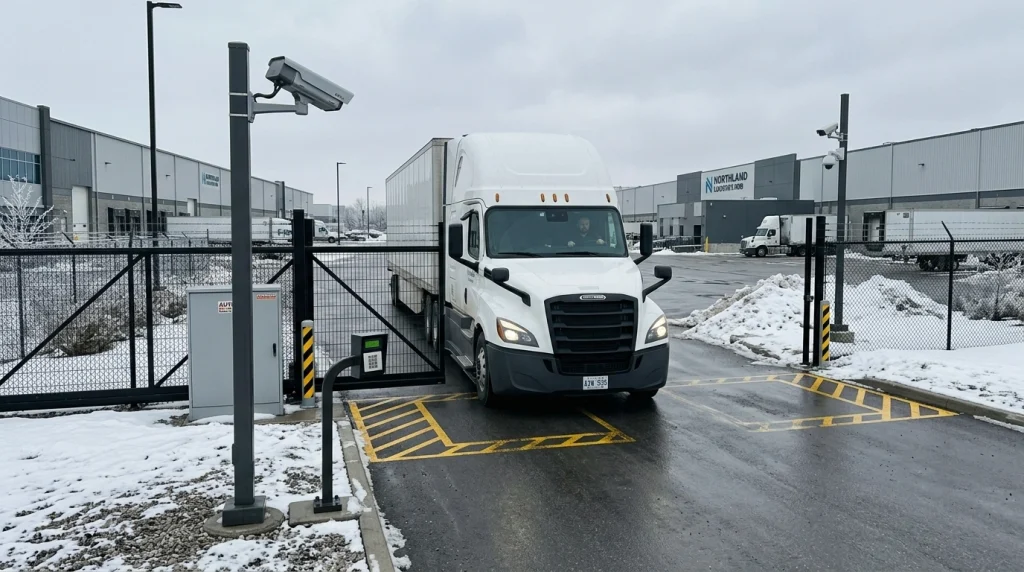
Keypad, Card, LPR, or App? Comparing Access Control Options for Automated Commercial Gates
If you manage a warehouse in Mississauga, run operations at a logistics hub near the 401, or oversee security at a hospital campus in Ottawa, there is a good chance you have dealt with this question at least once: what is the best way to control who gets through your gate?
It sounds simple enough. But once you start looking at the options available today, you realize the decision is a lot more layered than most people expect. Between keypads, card readers, license plate recognition (LPR), and smartphone apps, each technology brings its own strengths, trade-offs, and quirks that only become obvious once the system is actually installed and running through a full Canadian winter.
This guide is written for the people who rarely get talked to directly in most access control articles: facility managers, property owners, operations leads, and security directors working at industrial sites, commercial complexes, airports, hospitals, transit stations, and municipal infrastructure across Canada. We are going to walk through each option honestly, cover the stuff that almost never gets discussed, and help you figure out which setup actually fits your site.
Option 1: Keypad Access (PIN Entry)
Keypads are the oldest form of electronic gate access, and they have stuck around for a reason. The concept is dead simple. A user walks up or drives up, punches in a code, and the gate opens. No cards to carry. No apps to download. No cameras to maintain.
For smaller commercial properties, self-storage yards, or secondary pedestrian gates at industrial sites, keypads still make a lot of sense. The hardware is affordable, installation is straightforward, and most people already know how to use one without any training.
But here is where things get tricky, and where most vendors will not be upfront with you.
When everyone on a site shares a single PIN code, you have zero visibility into who actually entered the property and when. If a break-in happens at your Brampton distribution centre on a Saturday night, and 40 employees all use the same code, your security footage becomes the only way to figure out what happened. The access log itself tells you nothing useful.
You can solve this by assigning individual PINs, but that creates a management headache that grows with every new hire, every contractor rotation, and every seasonal worker. For a site with 200+ users, managing unique codes becomes a part-time job on its own.
There is also the Canadian weather factor that nobody seems to talk about. Keypads installed on outdoor gooseneck posts take a beating from November through April. Snow, ice, road salt, and freezing rain all attack the buttons and the internal wiring. If your keypad is not rated for outdoor use in temperatures well below minus 20, expect service calls during the coldest weeks of the year, which is exactly when you need your gate working the most.
Best for: Low-traffic secondary gates, self-storage facilities, pedestrian entry points at industrial yards.
Option 2: Card and Fob Readers (RFID)
RFID card and fob systems are the workhorse of commercial access control across Canada. You have probably used one yourself at an office building, a gym, or a parking garage. Each user carries a card or key fob that communicates with a reader mounted near the gate. Tap, beep, the gate opens.
The biggest advantage here is individual accountability. Every card or fob is tied to a specific person, which means your access logs actually tell you who came in, when they came in, and through which entry point. For hospitals, airports, LRT maintenance yards, and any facility where compliance and audit trails matter, this is a critical feature that keypads simply cannot match.
Card systems also integrate well with broader security setups. You can tie RFID readers into camera systems, intercom panels, alarm monitoring, and time-attendance software. If you are running a multi-building campus or a complex with several controlled entry points, cards let you create layered access zones where certain people can only enter specific areas during specific hours.
The drawback? Cards get lost. Fobs end up in the washing machine. Employees leave the company and forget to return their credentials. Industry data suggests that roughly 20 percent of physical access credentials are lost or unaccounted for in any given year. That number adds up fast at a large facility.
There is also a security gap that Canadian property managers should be aware of. Older 125 kHz proximity cards, which are still very common in legacy systems across Ontario and Quebec, transmit a static unencrypted signal. These cards can be cloned with inexpensive equipment available online. If your facility was built or last upgraded more than ten years ago, it is worth checking whether your readers are using the older low-frequency technology or the newer 13.56 MHz encrypted smart cards that follow ISO/IEC 14443 standards.
Best for: Corporate offices, hospital campuses, airport service areas, multi-tenant commercial buildings, any facility that needs detailed access logs.
Option 3: License Plate Recognition (LPR)
LPR is the access control option that feels the most futuristic, and for high-volume vehicle sites, it can be genuinely transformative.
The way it works: a specialized camera with infrared illumination captures a photo of each vehicle's license plate as it approaches the gate. Software reads the plate number, checks it against a whitelist database, and if it matches, the gate opens automatically. No stopping, no rolling down the window, no tapping a card on a reader mounted too far from the driver's window (we have all been there).
For trucking terminals, distribution centres, fleet yards, and parking facilities with heavy traffic, LPR removes the biggest bottleneck in the access process. Vehicles move through faster, queues at the gate shrink, and you get a timestamped photo record of every single vehicle that enters and exits.
But there are a few real-world challenges that come up in Canada specifically.
Snow and slush are the obvious ones. A license plate caked in road salt and grey slush during a February storm is much harder for a camera to read than a clean plate on a dry summer day. Most modern LPR systems have gotten significantly better at handling this, but accuracy still drops in severe winter conditions. Ice buildup on the camera lens is another issue that requires either heated housings or regular manual cleaning during the cold months.
Then there is the privacy question, and this one matters more than most people realize.
Under PIPEDA (the Personal Information Protection and Electronic Documents Act), a license plate number tied to a vehicle owner is considered personal information. If your commercial property is collecting, storing, and processing license plate data as part of an access control system, you have obligations around how that data is handled, how long it is retained, who can access it, and whether individuals have been properly informed. In Quebec, the rules are even tighter under Law 25, which introduced stricter biometric and surveillance data requirements in recent years.
This is the kind of thing that almost never comes up in sales conversations about LPR, but it absolutely should. If you are running a facility in Ontario or Quebec and considering LPR, talk to your legal and compliance team about data retention policies before the system goes live.
Best for: Trucking terminals, logistics hubs, fleet management yards, high-traffic commercial parking, distribution centres.
Option 4: Smartphone App (Mobile Credentials)
Mobile access control has gone from a novelty to a serious contender over the past few years. Instead of carrying a card or fob, users download an app on their phone and use Bluetooth, NFC, or a cellular connection to open the gate. Some systems even work with CarPlay and Android Auto, so the gate opens as you pull up without touching your phone at all.
For facility managers dealing with high employee turnover, rotating contractors, or temporary vendor access, mobile credentials solve a major pain point. You can issue or revoke access instantly from a cloud dashboard without needing to be on-site. There are no physical cards to buy, distribute, collect, or replace. A new hire can have gate access within minutes of receiving an email invite.
The cloud-based management side is where things get really interesting for multi-site operations. If you manage several industrial properties across the GTA, or if your organization operates facilities in different provinces, a centralized mobile platform lets you control access across all locations from a single interface. You can set time-based rules, create visitor passes with automatic expiration, and pull access reports without calling each site individually.
So why is not everyone using app-based access already?
For starters, you are depending on the user's phone having battery life, a working Bluetooth radio, and the app actually running properly. Anyone who has stood outside a building in minus 25 weather in Winnipeg or Edmonton, trying to get their frozen phone to cooperate, understands this frustration on a personal level.
There is also an adoption gap at certain types of facilities. At an industrial yard where workers wear heavy gloves and do not carry their personal phones on the shop floor, mobile credentials are not always practical. The same goes for sites where cell coverage is spotty, which is more common at remote Canadian industrial locations than people think.
And then there is the question of ongoing cost. Many cloud-based mobile access platforms operate on subscription pricing, typically charging per access point per month. For a single gate, that might be very reasonable. For a large campus with a dozen controlled entry points, the monthly fees can add up to a significant annual expense that needs to be weighed against the upfront cost of a traditional card system.
Best for: Multi-site corporate operations, properties with high staff turnover, facilities that manage frequent contractor and visitor access, modern commercial campuses.
The Questions Canadian Facility Managers Actually Ask (But Rarely Get Answers To)
"Do I need a building permit to install a gate automation system with access control?"
In many Ontario municipalities, yes. The permit requirements depend on the height of the gate, whether it crosses a property setline, and whether electrical work is involved. Toronto, Mississauga, Brampton, and Ottawa all have different bylaw thresholds. Get this checked before your contractor starts pouring concrete for the gate posts, not after.
"Can I combine two or more access methods on the same gate?"
Absolutely. In fact, layering is becoming the standard approach for commercial and institutional properties. A common setup might use LPR for regular employee vehicles during business hours, a card reader for after-hours access, and a keypad as a backup for visitors or delivery drivers. Modern gate controllers can manage multiple credential types simultaneously.
"What happens when the power goes out?"
Every properly installed automated gate system should have a battery backup and a manual release mechanism. This is not optional for commercial properties in Canada, especially given the ice storms and wind events that knock out power across Ontario and Quebec every winter. Make sure your installer includes an emergency release that can be operated without tools, and that your staff knows where it is and how to use it.
"Will my access control system work in extreme cold?"
This depends entirely on the quality of the hardware and the installation. Cheap consumer-grade equipment will fail. Commercial-grade gate operators from manufacturers like LiftMaster, which are designed for high-cycle use, include options like gearbox heater kits and cold-weather lubricants rated for Canadian winter conditions. The keypads, readers, and cameras you choose also need to be rated for outdoor use in temperatures down to at least minus 30 Celsius.
"Who is responsible if LPR data gets breached?"
You are. Under PIPEDA, the organization that collects the personal information is accountable for its protection. That means having proper cybersecurity measures on your network, encrypted data storage, limited access to the database, and a clear data retention and disposal policy. This is not something your gate installer will set up for you. It requires coordination between your IT team, your security provider, and potentially a privacy consultant.
Matching Access Control to Your Gate Type
The access control method you choose also needs to work well with the physical gate at your entry point. Not every combination makes sense.
Sliding Gates
Sliding Gates are one of the most popular choices for industrial and commercial sites because they handle wide openings, move quickly, and pair easily with any access control type. Whether you are using a keypad, card reader, LPR camera, or mobile app, sliding gates integrate smoothly with all of them.
Cantilever Gates
Cantilever Gates are an excellent option for Canadian sites specifically, because they do not use a ground track. In a country where snow, ice, and frost heave can jam a track-mounted gate from October through April, going trackless eliminates one of the most common winter failure points. Cantilever gates work well with all access control types and are built for the kind of heavy daily use you see at transport depots and utility facilities.
Swing Gates
Swing Gates are a solid choice for commercial driveways, parking lots, and institutional sites where the opening width is moderate and there is enough room for the gate panels to swing inward or outward. They work well with card readers, keypads, and remote systems, and can be fitted with automation kits for motorized operation.
Barrier Arms
Barrier Arms are designed specifically for high-traffic vehicle environments like parking lots, commercial building entries, and toll-style gatehouses. They integrate naturally with RFID readers, keypads, ticket dispensers, and LPR cameras. If your primary need is regulating vehicle flow rather than full perimeter lockdown, barrier arms are fast, efficient, and built for constant cycling.
Overhead Sliding Gates (Truss Gates)
Overhead Sliding Gates (Truss Gates) are built for the heaviest commercial and industrial applications, covering wide openings of 20 to 40 feet or more at trucking terminals and distribution facilities. Their overhead bracing prevents sagging over long spans, and they can be motorized with chain-driven systems that pair with any access control method.
Crash-Rated Barriers
For high-security environments like airports, government buildings, data centres, and critical infrastructure, Crash-Rated Barriers provide the highest level of physical protection. These systems meet ASTM and Department of Defence impact standards, and they come integrated with automation and access control. When your site demands certified anti-ram protection combined with controlled entry, this is the product category to look at.
Automated Gate Systems
For a complete automation solution that brings all of these elements together, including heavy-duty motors, safety sensors, emergency release systems, and integration with intercoms and cameras, Automated Gate Systems from Firm Fence cover the full scope of what a commercial or industrial site needs.
So, Which One Should You Choose?
There is no single right answer, and anyone who tells you otherwise is probably trying to sell you one specific system.
The best approach is to start with your site's reality. How many vehicles and people move through your gate each day? Do you have regular employees, rotating contractors, or public visitors? Is your gate exposed to snow, ice, and salt for six months of the year? Are you subject to compliance requirements around access logging or data privacy?
Once you map out those factors, the right technology (or combination of technologies) tends to become pretty clear.
If you are managing a commercial or industrial property in Ontario and want to talk through the options with people who have been doing this since 1979, Firm Fence specializes in exactly this kind of work. From gate selection and automation to access control integration, their team works across industrial yards, corporate facilities, hospitals, transit infrastructure, and high-security sites throughout the province.
Related Reading


The right access control setup is the one that matches your traffic patterns, your climate, your compliance obligations, and your operational budget. Start with those realities, and the technology choice becomes straightforward.
Ready to Secure Your Site?
Reach Firm Fence at 416-233-1811 or schedule a free estimate and site consultation to find the right access control and gate automation solution for your property.
Schedule a Free Consultation